SMARTY is one of the cheapest ways to get a UK eSIM — a real UK data connection delivered instantly to your phone, with no physical SIM card and no waiting for delivery. The SMARTY 2GB data-only eSIM runs on SMARTY's UK network (powered by Three), installs in minutes, and works as an international eSIM the moment you enable roaming.
In this guide, I'll walk you through the entire process: checking your phone is compatible, ordering the plan, paying with an international card (a Bybit card, an OKX card, or your own card with international payments enabled), and installing the eSIM on iPhone or Android — even if you've never used an eSIM before.
What you get with the SMARTY eSIM
Unlimited internet access using vpn
Validity 6 months
Network: SMARTY UK (runs on all network in nigeria)
Delivery Instant — QR code by email
Use abroad: Yes
It's the go-to cheap UK SIM option if you need a UK IP address, want a backup data line while travelling, or want to try a data-only eSIM without committing to a long contract — there's no credit check and no lock-in.
💡 Data-only means exactly that: the plan provides internet data only — no traditional calls or SMS. Everything you'd use calls and texts for (WhatsApp, Telegram, etc.) works perfectly over the data connection.
Key requirements — check before you start
Before ordering, make sure you have all of the following ready:
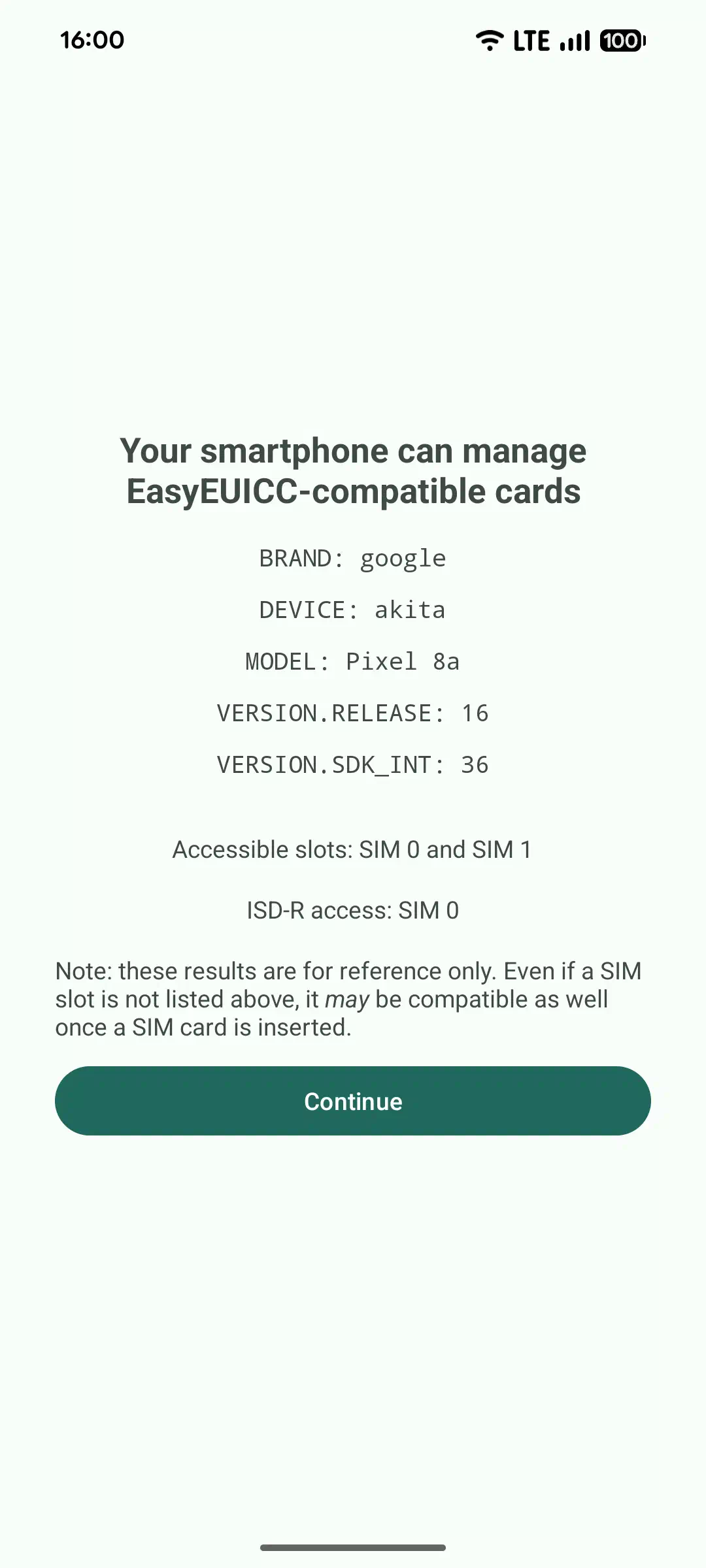
- An eSIM-capable phone. Most phones from around 2019 onwards support eSIM (iPhone XR and newer, Samsung S20 and newer, recent Pixels, etc.). Not sure? Dial
*#06# — if an EID number appears, your phone supports eSIM.
- A workaround if your phone has no eSIM support. A third-party eSIM adapter (a physical card that holds eSIM profiles) can sometimes help — results vary by device and network, so check reviews for your exact phone model first.
- A payment card that works internationally. SMARTY is a UK provider, so your card must be able to pay in GBP. The options people commonly use:
- A virtual card from Bybit or OKX (both issue virtual cards that handle international payments well)
- Your local bank card with international/online payments enabled
- A working email address — this is where your QR code and activation code will be sent. Double-check the spelling before submitting.
- A stable Wi-Fi connection for the installation step (the eSIM profile downloads over the internet).
Step-by-step guide
1. Open the direct order link
Go to the SMARTY 2GB data-only order page: Click here to open the SMARTY order page
This takes you straight to the plan — no browsing or plan-hunting needed.
2. Select eSIM
On the plan page you'll be asked which SIM type you want. Choose eSIM.
This is important — if you pick a physical SIM by mistake, it would have to be shipped to a UK address. eSIM is delivered instantly by email instead.
3. Fill in your details
Enter your details as requested:
- Full name
- Date of birth
- Email address (make sure it's correct — this is where the eSIM QR code goes)
- Any other required fields
4. Marketing preferences & Switch option
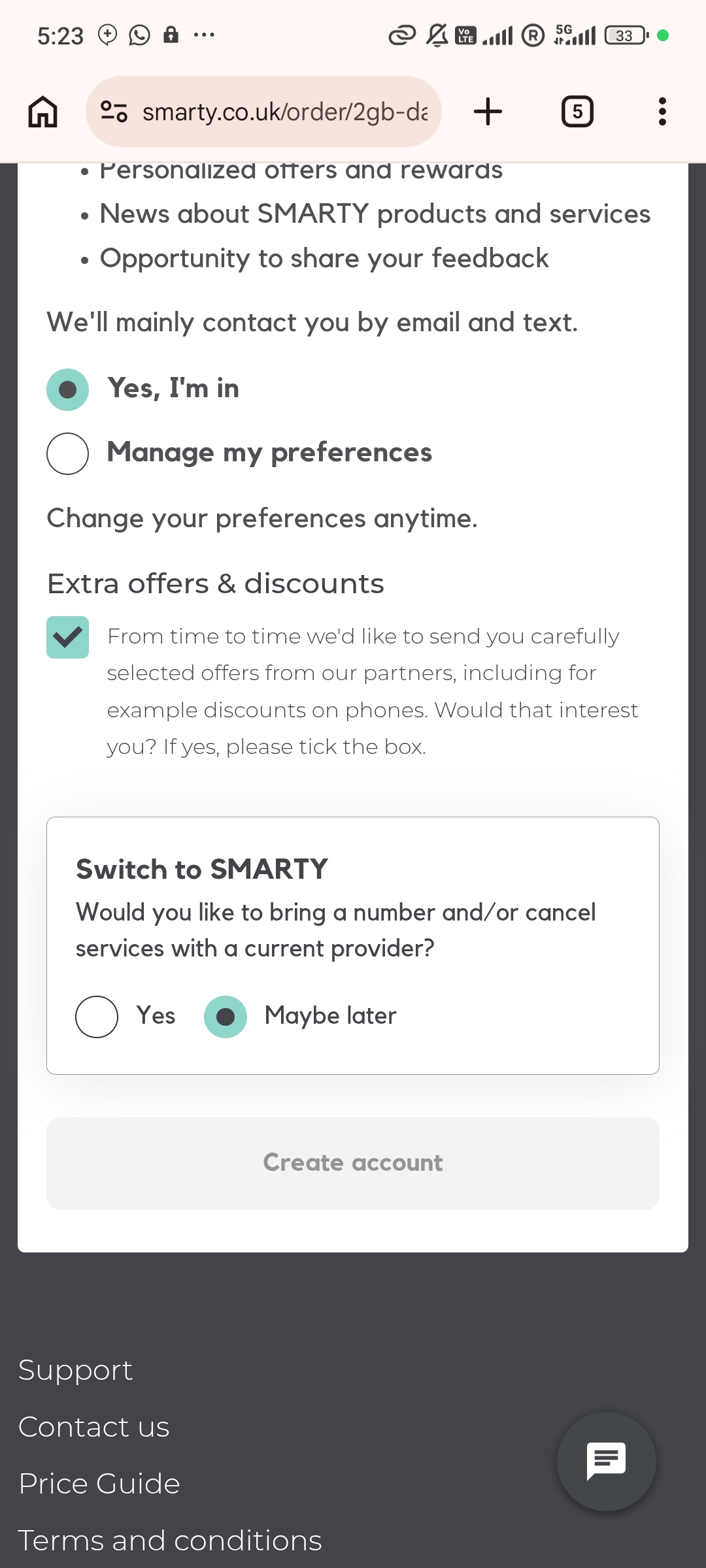
On this page:
- Choose whether you want marketing emails — either "Yes, I'm in" or "Manage my preferences" if you'd rather not receive them. This choice doesn't affect your order.
- Under "Switch to SMARTY", select Maybe later (you're buying a new plan, not switching an existing UK number).
- Tap Create account.
5. UK address and payment
The next page asks for a UK address and your card details.
- Enter the required address information as prompted.
- Enter your card details and complete the payment with a card that supports international transactions — this is where a Bybit card, OKX card, or any card with international payments enabled comes in.
⚠️ If your payment is declined: don't retry repeatedly (multiple attempts can trigger a fraud lock). Instead, check that your card has international/online payments turned on, confirm you have enough balance plus a small buffer for currency conversion, then try once more — or switch to a different card.
6. Wait for the confirmation email
After a successful payment, check your inbox (and spam folder, just in case). You'll receive a confirmation containing:
- Your eSIM QR code
- A short activation / confirmation code (separate from the QR code — keep it handy)
Keep this email safe — you'll need it in the next step, and possibly again if you ever reinstall.
7. Install the eSIM
First, connect to Wi-Fi (the eSIM profile has to download). Then:
On iPhone:
- Settings → Mobile Service (or Cellular)
- Add eSIM
- Use QR Code
- Scan the QR code from your confirmation email
- When prompted, enter the confirmation / activation code from the email
On Android (menu names vary slightly by brand):
- Settings → Connections (or Network & Internet)
- SIM Manager
- Add eSIM
- Scan the QR code
- Enter the activation / confirmation code when prompted
The profile installs in a few seconds, and the eSIM appears as a new line in your SIM settings.
8. Enable roaming (if using it outside the UK)
Once the eSIM is installed:
- Go to your phone's mobile network settings
- Select the SMARTY eSIM line
- Turn on Data Roaming
Without this, the eSIM will connect in the UK but stay offline everywhere else. If it doesn't connect immediately, toggle airplane mode on and off, or restart your phone.
Important: turn off auto-renewal
🔔 Remember to turn off auto-renewal after a successful installation.
SMARTY plans renew automatically each month and charge your card again. If you only want the one month:
- Log in to the SMARTY website (or app) with the account you created
- Open your plan / dashboard
- Turn off auto-renewal (or cancel the recurring payment)
Your eSIM keeps working until the 30 days run out — cancelling just stops the next charge.
Troubleshooting
| Problem | Fix |
|---|
| QR code won't scan | Increase screen brightness, clean the camera lens, or enter the details manually — most phones offer a "Enter details manually" option where you type the activation code from the email |
| "eSIM already in use" error | The profile can only be installed on one device. If you removed it by accident, contact SMARTY support to reset it |
| No service after installing | Toggle airplane mode, confirm Data Roaming is on, and give it up to 2 hours — activation is usually fast but can take longer |
| Payment declined | See step 5 above — check international payments are enabled and retry once, or use a different card |
| Deleted the confirmation email | The QR code and codes are also available in the SMARTY app / website dashboard |
Quick tips
- Activation is usually fast — a few minutes — but can occasionally take up to 2 hours.
- Keep the QR code email and confirmation code saved somewhere safe until the eSIM is fully working.
- You can manage the plan anytime through the SMARTY app or website dashboard — check data usage, change plans, or disable auto-renewal.
- Don't delete/remove the eSIM profile from your phone unless you're sure you're done with it — reinstalling may require SMARTY support to reissue it.
That's everything — order, pay, scan, roam. If you get stuck anywhere, drop a comment below and I'll help you out.